
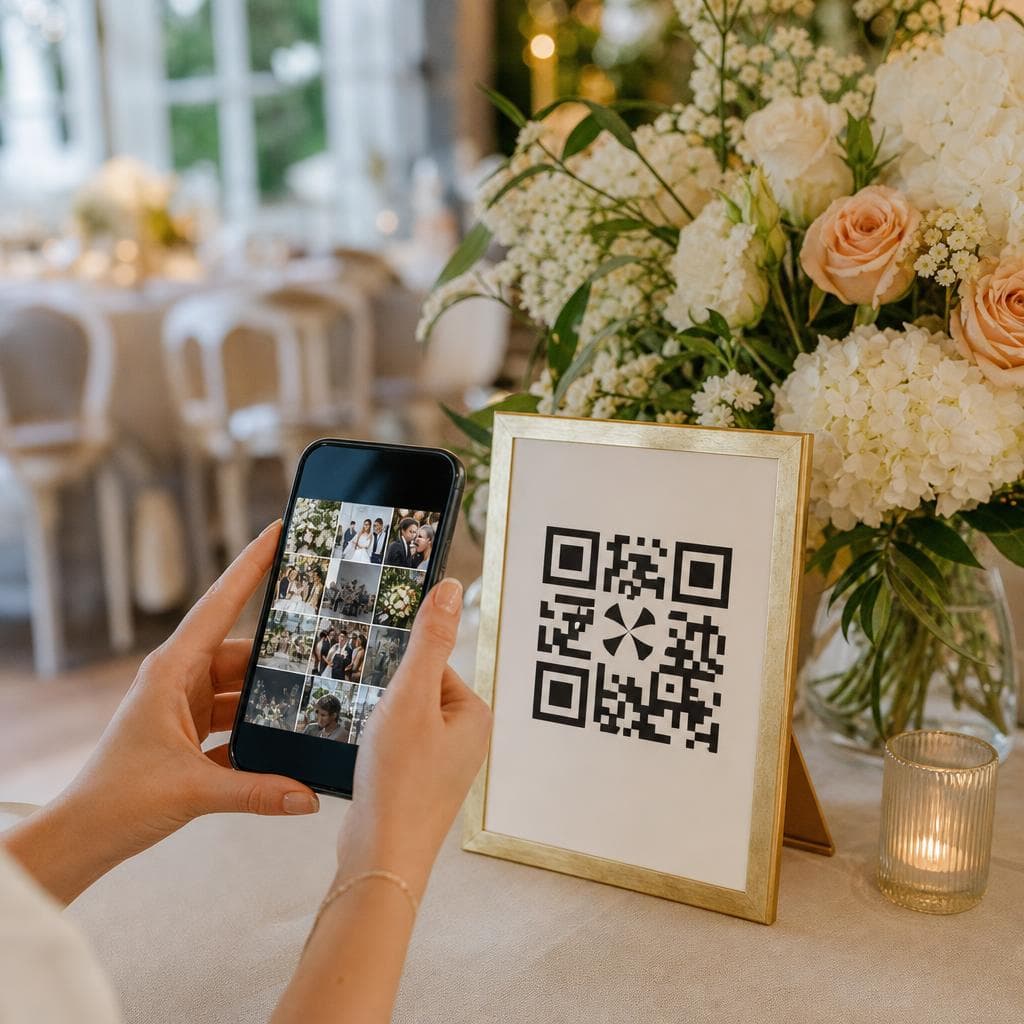
Wedding QR code: sharing photos with guests
A QR code placed near the guestbook or the photobooth can turn a phone into a collection point: the guest scans, opens a page and adds a photo. The code does not store images and does not, by itself, create an album. It only points to a web address. For the experience to work, you must therefore prepare an external space capable of receiving files, choose a QR code generator and test the flow before printing. This distinction avoids unpleasant surprises on the wedding day.
Understand what a QR code actually does
A shortcut, not a storage space
The code usually contains a URL. When a guest scans it with their phone camera, the phone opens the associated link. The destination page may offer an upload form, a shared album or a folder configured to receive files. The QR code hosts nothing and guarantees neither the longevity of the link, nor the storage capacity, nor the privacy of the page.
You must therefore check separately the service that receives the photos: maximum file size, file types, compression, quota, viewing rights and retention period. An upload solution may be time-limited or depend on a subscription. Do not tell guests there is unlimited or permanent storage if the service conditions do not promise it.
What DreamWeds offers, and does not offer
To date, DreamWeds does not provide a QR code that automatically uploads guests' photos. The QR code in this article must point to an external upload solution capable of receiving files. DreamWeds therefore does not automatically retrieve these images via this setup. This clarification is important for choosing a tool, informing your loved ones and avoiding the belief that a simple code is enough.
The DreamWeds blog can help you prepare other steps of your wedding. For photography services, also consult the directory of providers, then check directly with the professional the delivery and backup terms provided in the contract. To distinguish roles, read photographer and guests' photos.
Prepare the sharing space before creating the code
Choose a suitable external solution
Look for a page or a folder with a mobile upload function. Ideally, you should be able to drop a file without giving all guests the right to delete or administer. Some tools offer a deposit-only upload form, others provide an album where everyone can see the files. The two uses are different.
Before choosing, note:
- the maximum size per file and the number of allowed files;
- the compression applied to photos and videos;
- whether creating an account is required;
- who can view, download or delete files;
- the link expiration date and the export procedure;
- how to request the removal of a photo.
Prepare a short, stable address, then configure access rights. Do not use a personal link that exposes your other documents. If the service allows a password, decide whether it will be displayed on the sign with the code or transmitted to close ones in another way.
Write an honest instruction
A destination page can be perfectly configured and remain unused if the sign doesn't say what to do. Write a short instruction: "Scan to add your wedding photos." Add a sentence about consent: "Share only images you are authorized to share." You can state that uploads are optional and indicate a closing date.
If you need a more complete method to collect images, read collecting guests' photos after the wedding. To understand the value of a shared space, see why create a shared wedding album.
Create the QR code correctly
Choose a reliable generator
Use a QR code generator that produces a readable code and clearly indicates whether it is static or dynamic. A static code redirects directly to the recorded URL; if that address changes, the printed code does not update. A dynamic code can allow you to change the destination, but it often depends on an account or a plan whose conditions must be understood.
After creation, download a version large enough for the chosen medium. Keep the original file in your wedding folder. Do not add an overly large logo in the center and keep a white margin around the code. The contrast between the pattern and the background must remain sharp: avoid faint printing, a dazzling glossy paper or an overlay on a photo.
Test before printing
Test the code with several phones, at least one iPhone and one Android device if possible. Check access on Wi‑Fi and on mobile data. Perform a real photo upload, open the page in private browsing and check the rights obtained by a guest. Also see what happens if the file is too large, if the user denies a permission or if the link is opened after signing out.
Ask someone who doesn't know the setup to follow the instruction without help. If they don't understand where to tap, your guests may give up. Fix the text or the page rather than relying on a verbal explanation on the night of the reception.
Install the code on the wedding day
Provide multiple displays
Place the QR code at phone height, at the entrance, near the guestbook and next to the photobooth. A small sign on a table can be hidden by a vase or a bouquet; provide a visible version on the wall or on an easel.
Leave an empty area around the code and print it large enough to be scanned at the planned distance. Avoid placing the code behind glass or on a surface that creases.
Protect people and files
Inform about image use
A guest who uploads a photo generally consents to send it to the organizer, not necessarily to have it published everywhere. Explain who can view the collection, how long it will remain open and how to request the deletion of an image. Ask for permission before publishing a photo in which a person is recognizable, notably a child or a guest who does not wish to appear.
Restrict access to the concerned people and disable public indexing if the service allows it. Avoid associating photos with full names, the seating plan or the venue address. A private gallery better protects memories than a link circulated without control across multiple groups.
Back up and close properly
After the wedding, export the originals to two independent storage media. Check that they open before closing the space. Then consult the service's retention policy: the link may expire, files may be deleted after a given period, or a quota may prevent new uploads. The printed QR code does not extend any storage duration.
When the collection is finished, remove the right to add files or replace the destination with an information page, if the tool allows it. Keep a copy of the final content and the consent text. For next steps, organize your memories after the wedding will help you move from collection to a controlled archive.
Frequently asked questions
Can a QR code store photos directly?
No. It mainly contains a web address and redirects the phone to a page. You need an external service able to receive files, with its own storage, security and retention rules.
Does DreamWeds automatically retrieve photos via a QR code?
No. DreamWeds does not currently offer a function that creates a QR code and automatically uploads guests' photos. You must link the code to an external upload solution and check that solution's conditions yourself.
Do I need a dynamic QR code?
Not necessarily. A static code is fine if the URL will not change. A dynamic code can be useful if you need to modify the destination after printing, but check its subscription, validity period and access conditions. Simplicity is often preferable for a wedding.
How do I know if guests can upload a video?
Do a real test with a short video before printing. Check the maximum size, allowed formats, compression and quota. If videos are not accepted or are too large, indicate this in the instruction and offer another channel.
What to do if an uploaded photo is problematic?
Remove it from the gallery as soon as possible, check who could have downloaded it and request its removal from any selections already shared. Inform the people who administer the space. A private link does not exempt you from respecting a photographed person's request.
DreamWeds
Find your dream vendors
Photographers, caterers, venues and much more — compare up to 4 vendors side by side.
Discover vendorsArticles on the same topic
Wedding hashtag: how to choose a good one?
Original, easy to remember and unique: the method to create a wedding hashtag that your guests will actually use.

Wedding guest attire: what to wear according to the dress code?
Understanding common dress codes, adapting to the venue and season, and avoiding classic faux pas as a guest.

Thank-yous after the wedding: when and how to thank your guests?
Message, card, photo or personalized gesture: prepare your thank-yous without waiting several months.